
Running a small business means every dollar counts. The last thing you want is to pay hundreds of dollars a year for accounting software when free options exist that handle everything you need.
But “free” means very different things depending on the product. Some tools lock core features behind paid plans. Others limit how many invoices you can send, cap the number of customers, or add a “powered by” watermark to your documents. A few genuinely give you everything at no cost.
This guide covers what to look for, what features your business actually needs, and what separates software worth using from software that will slow you down.
What to look for in free accounting software
Before comparing options, it helps to know what “complete” looks like for a small business. Here are the five criteria that separate useful free software from software that feels free until you need it to do something real.
1. No feature gating
The best free plans give you the full feature set. Paid upgrades should be triggered by scale (more users, more companies, more storage) rather than by locking useful features behind paywalls. If you cannot generate a P&L report on the free plan, the software is not actually free.
2. Multi-currency support
If you invoice clients in different currencies, or if your business operates in a country where you also work with USD or EUR, multi-currency is not optional. Look for software with live exchange rates built in from day one, not added as a premium feature.
3. GST and VAT readiness
Businesses in India, UAE, Australia, Canada, and the UK all have specific tax compliance requirements. Good accounting software handles these automatically: the correct tax rate appears on invoices, tax reports are available at a click, and you are not manually calculating tax at year end.
4. Real reports
A profit and loss statement, balance sheet, and cash flow report are not extras. They are the minimum you need to understand whether your business is actually profitable. Free software that does not include these is not accounting software. It is an invoice generator.
5. Clean data export
You should be able to export your data at any time. Look for CSV export on all major modules. If you ever decide to switch, your financial history should be fully portable.
Core features every small business needs
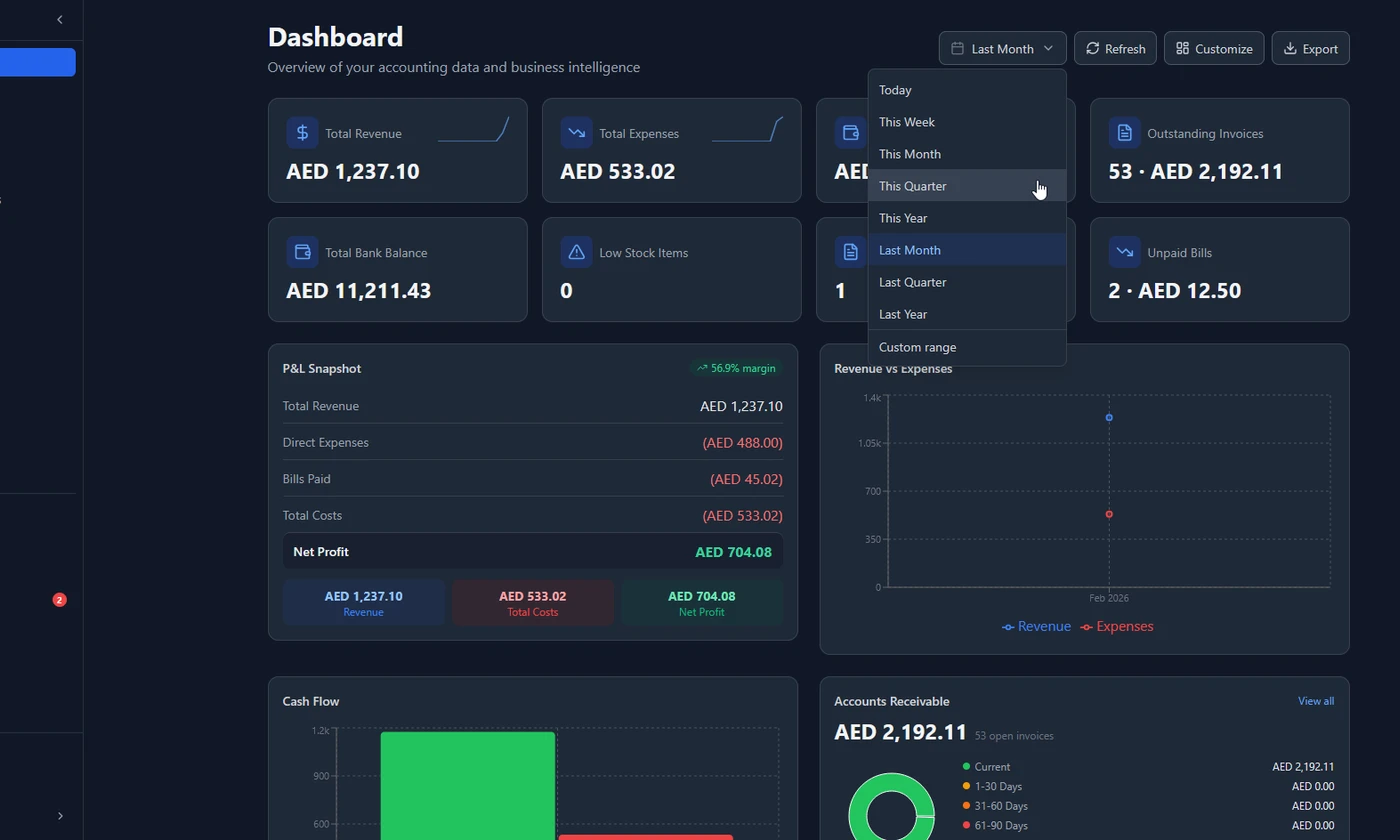
Once you have a shortlist, check for these specific capabilities.
Invoicing and payment tracking
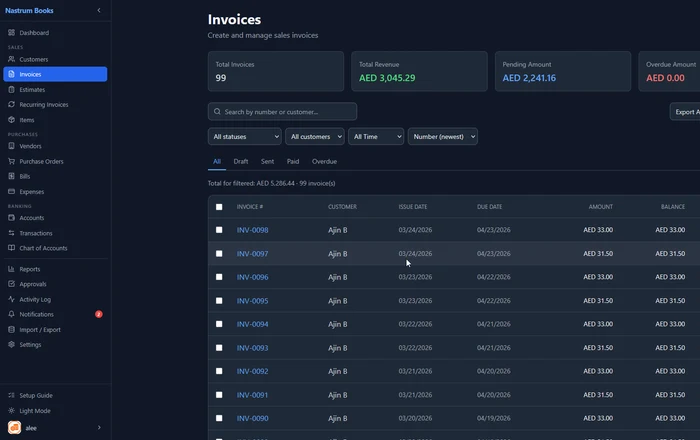
Your invoicing module should let you create professional invoices, send them by email as a PDF, set payment terms, and track whether invoices are paid, pending, or overdue. Recurring invoices matter too. If you have monthly retainer clients, you should not be manually recreating invoices every month.
Estimates and quotes are worth checking as well. If you send quotes before work begins, you need to be able to convert them to invoices without re-entering everything.
Expense tracking
Track every business expense by category, attach receipts (photos or PDFs), and get a clear view of where your money is going. If you have a team, approval workflows matter: expense claims should not go straight to payment without someone reviewing them.
Banking and reconciliation
Connect your accounts (bank accounts, credit cards, cash) and reconcile transactions against your records. This step is what separates businesses with accurate books from businesses that discover problems at tax time.
Accounts Receivable management
Know exactly who owes you money, how much, and how long it has been outstanding. An AR ageing report shows you which invoices are 30, 60, or 90+ days overdue so you can follow up at the right time.
Reports that actually tell you how your business is doing
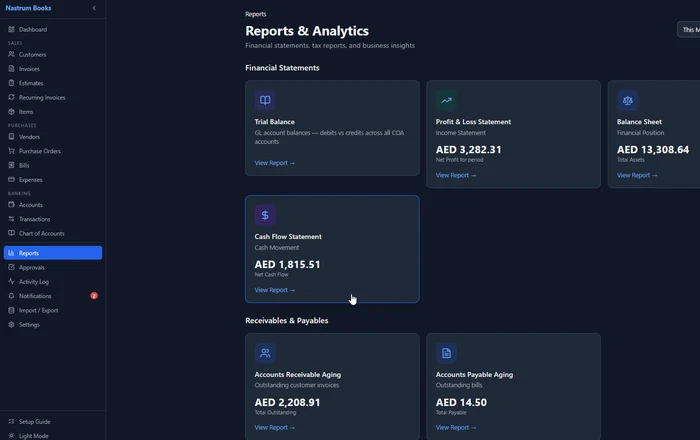
A good accounting platform should generate at minimum:
- Profit and Loss (are you actually making money?)
- Balance Sheet (what does your business own vs owe?)
- Cash Flow Statement (is cash coming in faster than it is going out?)
- Trial Balance (is everything balanced?)
- AR Ageing (who owes you, and for how long?)
- AP Ageing (who do you owe, and by when?)
- Tax Report (what is your GST or VAT liability for the period?)
These are the reports your accountant will ask for at year end. They are also the reports that help you make smart decisions all year round, not just during tax season.
Multi-currency and tax compliance
If your business invoices clients in multiple currencies, or operates across borders, the software needs to handle exchange rates automatically. Manual currency conversion is a recipe for errors and is simply not practical at scale.
For businesses in India, look for GST support: CGST, SGST, IGST, and HSN code fields on invoices. For businesses in the UAE, VAT at 5% needs to be applied on the correct line items, and your software should generate the reports needed for FTA filing.
Generic tax configuration also matters for businesses in other markets. You should be able to set up your own tax rates and apply them per product or service.
Every feature included. Multi-currency, GST, VAT, 14 reports, recurring invoices, bank reconciliation. No feature gating.
Start Free →What makes free software worth using long-term
The best free accounting software does not treat you as a trial user. It gives you a complete product that happens to have a free tier for smaller-scale use.
Signs you have found the right tool:
- No “powered by” watermark on paid documents unless you want it there
- All feature modules are accessible from day one
- Upgrades are triggered by scale, not by feature access
- Multi-company support lets you manage more than one business from the same account
- Team access does not require per-seat fees that add up fast
- The mobile experience is solid because you will need it on the go
Nastrum Books is built around this philosophy. The Solo plan is free forever and includes every feature in the product. The only reason to upgrade is if you need more users, multiple companies, or more storage. Nothing is locked.
Making the switch
If you are moving from spreadsheets or from another accounting tool, here is what the process looks like:
- Set up your company profile — business name, tax number, currency, fiscal year start
- Import or enter your chart of accounts — your accountant can help with this
- Add your customers and vendors — most tools support CSV import
- Enter or import your opening balances — what you owned and owed on the start date
- Start creating invoices and recording expenses — from this point forward, the software tracks everything
Most small businesses can be fully set up in a weekend. The key is not overthinking the opening balance setup. If you are moving mid-year, your accountant can provide the trial balance figures you need.
Frequently asked questions
Ready to try it? Nastrum Books is free forever for solo users. No credit card. No time limit. Start your free account and be set up in under 10 minutes.