
GST registration changes everything for an Indian freelancer. Suddenly, every invoice needs to include the correct GSTIN, the right tax components (CGST, SGST, or IGST depending on the transaction), and the right HSN or SAC code. Your accounting software needs to handle all of this automatically, or your compliance burden becomes a weekly manual task.
The good news is that solid, free GST-ready accounting software does exist. This guide explains what GST means in practice for freelancers, what your software needs to do, and what to look for when choosing a tool.
GST for Indian freelancers: the essentials
Goods and Services Tax (GST) is a value-added tax applied to most goods and services in India. For freelancers and service providers, the key thresholds and rules are:
Registration threshold: Service providers with annual turnover above INR 20 lakh (INR 10 lakh for special category states) must register for GST. Once registered, all your invoices must be GST-compliant.
GST components on invoices:
- CGST + SGST: For services provided within the same state as the client (intra-state transactions). Each component is typically 9% for the standard 18% GST rate.
- IGST: For services provided to clients in a different state (inter-state transactions). Applied as a single 18% (or applicable rate) without splitting.
- Export of services: Zero-rated (0% GST). If your client is outside India, you charge 0% GST, but you still need to mention the tax details on the invoice.
HSN and SAC codes: Every invoice line item for a service must carry a Service Accounting Code (SAC). For most freelance services, this will be in the 9983xx or 998314 range depending on the nature of the work.
What a GST-compliant invoice must include
A GST invoice for services must contain all of the following:
- Your registered business name and address
- Your GSTIN (GST Identification Number)
- Invoice date and a unique sequential invoice number
- Client name, address, and GSTIN (if the client is GST-registered)
- Description of each service with SAC code
- Taxable value per line item
- GST rate and amount (split into CGST/SGST for intra-state, or IGST for inter-state)
- Total invoice value in INR
Missing any of these details means the invoice is not valid for your client to claim input tax credit. That can affect your professional relationships with larger companies that rely on ITC claims.
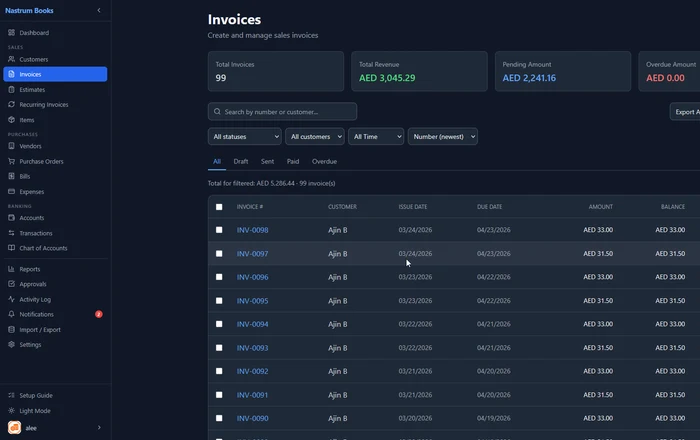
Setting up GST in your accounting software
The setup process in a GST-ready tool typically looks like this:
1. Configure your company details
Enter your legal business name exactly as it appears in your GST registration, your full registered address, and your GSTIN. This information will appear on every invoice you generate.
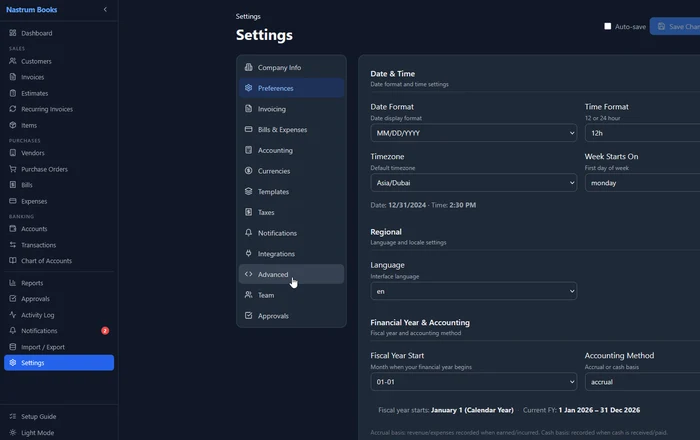
2. Set your fiscal year
In India, the financial year runs from 1 April to 31 March. Configure your accounting software to match this. Reports, tax summaries, and year-end statements should all align with the Indian financial year.
3. Set up GST tax rates
Create your tax configurations: 5%, 12%, 18%, and 28% GST, with the correct CGST/SGST split for intra-state and IGST for inter-state. Most GST-ready software includes these out of the box, but verify before you start invoicing.
4. Add SAC codes to your service items
Create your service catalogue in the Items or Products section. For each service type you offer, assign the correct SAC code. Once set, the code appears automatically on every invoice line item for that service.
5. Add your clients with their state
When you add a client, enter their state. Your software will use this to determine whether CGST/SGST or IGST applies on invoices to that client. If the client’s state matches yours, it applies CGST + SGST. If different, it applies IGST.
GST reports for freelancers
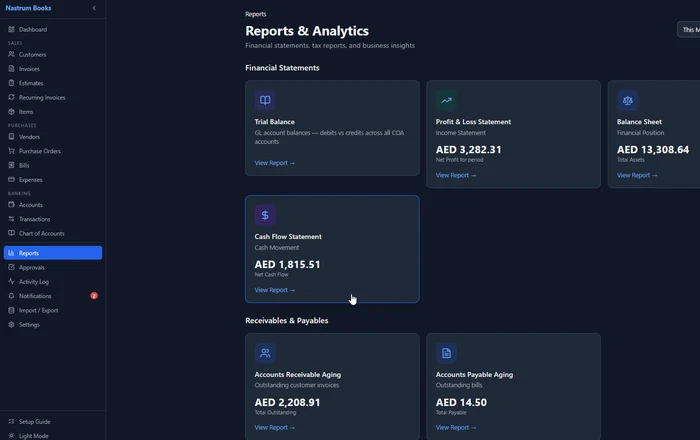
Once your invoicing is set up correctly, the reports your software generates make GST filing significantly simpler. The key reports for a GST-registered freelancer:
Tax Report: Shows total GST collected on sales (output tax) and total GST paid on purchases (input tax). The difference is what you owe (or are owed in refund) for the period.
Sales Report: Itemized view of all invoices by customer, amount, and GST component. Useful for GSTR-1 filing.
Expense Report: Itemized view of all expenses with GST paid. Useful for calculating input tax credit.
Profit and Loss: Shows your actual profitability after accounting for GST. Remember: the GST you collect from clients is not revenue. It is a liability you hold on behalf of the government until you file.
For most freelancers filing quarterly (QRMP scheme) or monthly, having these reports available in seconds makes the difference between filing on time and scrambling to compile data at the last minute.
Set up your GSTIN, configure tax rates, and start sending compliant GST invoices. Nastrum Books handles the calculations automatically.
Start Free →What to look for in free GST accounting software
When evaluating your options, check these specifics:
GSTIN field on invoices: The software must support displaying your GSTIN and the client’s GSTIN on tax invoices.
CGST/SGST/IGST split: The software needs to determine the correct tax components automatically based on the transaction type (intra vs inter-state). Manual splitting is not practical at scale.
SAC code support: You need to be able to assign SAC codes to service line items and have them appear on invoices.
INR currency with regional number formatting: Indian number formatting (lakhs and crores) is a nice-to-have. At minimum, the software should handle INR amounts cleanly without rounding errors.
GST filing reports: The software should generate output tax summaries that make GSTR-1 and GSTR-3B filing straightforward. Ideally, it provides a Tax Report that you can reference directly.
Multi-currency for international clients: If you work with overseas clients, you will invoice in USD, EUR, or GBP. The software needs to handle foreign currency invoices with zero GST (export of services) while keeping your INR books accurate.
Common GST mistakes freelancers make
These are the mistakes that result in notice from the GST department or problems when clients claim input tax credit.
Wrong tax component applied: Charging CGST/SGST on an inter-state invoice (or IGST on an intra-state one) invalidates the input tax credit claim for your client.
Missing GSTIN on the invoice: Both your GSTIN and the client’s GSTIN (when they are registered) must appear. Missing either means the invoice is non-compliant.
No SAC code: Required on all service invoices. Many freelancers skip this. It is not optional.
Invoices not in sequence: GST regulations require invoices to be numbered sequentially within a financial year. Gaps in numbering can flag during an audit. Use software that handles numbering automatically.
Recording GST collected as revenue: GST is a pass-through. You collect it on behalf of the government and remit it during filing. Your actual income is the pre-GST amount. Configure your books to reflect this correctly.
Frequently asked questions
Set up your GST configuration in minutes. Nastrum Books is free forever for solo users and includes full GST support for Indian businesses. Start your free account.